

Tokenpass API
Tokenpass is a global accounts (OAuth) service powering the Tokenly ecosystem. It acts as a central hub for "Token Controlled Access" (TCA) requests, allowing end users to register and prove ownership of their bitcoin addresses a single time instead of individually for every TCA powered application, as well as providing a layer of privacy (among other features).
Use this API to integrate Tokenpass into your own website, game or other application and empower your project with Token Controlled Access.
API Access
To obtain an API key pair for your application, simply head to https://tokenpass.tokenly.com, create an account and go to the "API Keys" section. You will then be asked to enter in a name for your client application, your app homepage URL, as well as a callback URL for OAuth requests (e.g https://example.com/account/authorize/callback)
Once your API keys are generated you are ready to integrate!
If you are using PHP, we recommend you use our TokenpassClient library, which can be
downloaded on github here, or if using Composer it can be included via composer require tokenly/tokenpass-client.
OAuth Integration
Tokenpass uses the OAuth 2.0 protocol for allowing users to sign in and connect to third party applications.
You can find out more about OAuth 2.0 here.
In this guide we will show you how to implement "log in with Tokenpass" for your app.
Source code for a working demo Laravel application can be found here.
Step 1: Set up
Prepare your application for API usage.
- Define a public endpoint route for OAuth callback requests (e.g https://my.app.io/account/authorize/callback)
- Generate an API key pair on https://tokenpass.tokenly.com (include callback endpoint)
- Add
tokenly_uuidandoauth_tokenfields to youruserstable in your local database.
If using PHP
- Include the
tokenly/tokenpass-clientlibrary in your project. - If using laravel, add
Tokenly\TokenpassClient\Provider\TokenpassServiceProvider::classto your service providers list and run the commandphp artisan vendor:publish --provider="Tokenly\TokenpassClient\Provider\TokenpassServiceProvider". You will also need to installlaravel\socialiteand add Socialite to your facades list. - Also if using laravel, edit the
redirectfield inconfig/tokenpass.phpas needed. - Define the following environment (.env) variables:
TOKENPASS_CLIENT_ID,TOKENPASS_CLIENT_SECRET,SITE_HOST - Set the
TOKENPASS_PROVIDER_HOSTenvironment variable tohttps://tokenpass.tokenly.com.
Otherwise..
- Optionally include your favorite OAuth2 helper library.
- Define the API key client ID + secret as constants/environment variables in your application.
Step 2: Initiate Login
    <?php
    namespace App\Http\Controllers;
    use Illuminate\Support\Facades\Auth;
    use Redirect, Request, Input, User;
    use Laravel\Socialite\Facades\Socialite;
    use Laravel\Socialite\Two\InvalidStateException;
    use App\Http\Controllers\Controller;
    use Tokenly\TokenpassClient\Facade\Tokenpass;

    class AccountController extends Controller {
        public function login()
        {
            if(Auth::user()){
                //already logged in, redirect to home
                return Redirect::route('account.home');
            }
            //else redirect to oauth provider
            return Socialite::redirect();
        }


        .....
    }
Create the login route in your app and redirect to Tokenpass to start the OAuth process if the user is not already signed in.
Redirect to Tokenpass Authorization:
Redirect the user to https://tokenpass.tokenly.com/oauth/authorize with the following [url encoded] query parameters:
client_id- your application client ID (API key)redirect_uri- URL to send user back to upon successful authorization (must match a callback endpoint in API client settings)scope- comma separated list of permission scopes your application is requestingresponse_type=codestate- randomized string generated by your application and saved in the users' session for callback validation
If you are using PHP+Laravel, the Socialite class can handle this for you.
After logging in, users are presented with a grant/deny permissions screen which looks like this:

Step 3: Implement Callback Endpoint
    <?php
    public function handleTokenpassCallback(Request $request)
    {
        try {
            // check for an error returned from Tokenly Accounts
            $error_description = Tokenpass::checkForError($request);
            if ($error_description) {
                return view('account.authorization-failed', ['error_msg' => $error_description]);
            }

            // retrieve the user from Tokenly Accounts
            $oauth_user = Socialite::user();


            // get all the properties from the oAuth user object
            $tokenly_uuid       = $oauth_user->id;
            $oauth_token        = $oauth_user->token;
            $username           = $oauth_user->user['username'];
            $name               = $oauth_user->user['name'];
            $email              = $oauth_user->user['email'];

            // find an existing user based on the credentials provided
            $existing_user = User::where('tokenly_uuid', $tokenly_uuid)->first();

            // if an existing user wasn't found, we might need to find a user to merge into
            $mergable_user = ($existing_user ? null : User::where('username', $username)->orWhere('email', $email)->where('tokenly_uuid', null)->first());

            $used_user = false;
            if ($existing_user) {
                // update the user
                $existing_user->update(['oauth_token' => $oauth_token, 'name' => $name, 'email' => $email,
                                        'tokenly_uuid' => $tokenly_uuid, 'username' => $username ]);
                $used_user = $existing_user;

            } else if ($mergable_user) {
                // an existing user was found with a matching username
                if ($mergable_user['tokenly_uuid']) {
                    throw new Exception("Can't merge a user already associated with a different tokenpass account", 1);
                }
                // update if needed
                $mergable_user->update(['name' => $name, 'email' => $email, 'oauth_token' => $oauth_token,
                                        'username' => $username, 'tokenly_uuid' => $tokenly_uuid]);
                $used_user = $mergable_user;

            } else {
                // no user was found - create a new user based on the information we received
                $create_data = ['tokenly_uuid' => $tokenly_uuid, 'oauth_token' => $oauth_token, 'name' => $name, 'username' => $username, 'email' => $email ];
                $new_user = User::create($create_data);
                $used_user = $new_user;
            }
            Auth::login($used_user);
            return redirect('/account/login');

        } catch (Exception $e) {
            // some unexpected error happened
            return view('account.authorization-failed', ['error_msg' => 'Failed to authenticate this user.']);
        }
    }
After selecting either Grant or Deny, the user is automatically redirected to your OAuth callback endpoint URL.
Here you verify the request, call back to Tokenpass one more time to receive the oauth_token, then save or update user details and complete the login process.
- Check if the
errorquery parameter is present indicating a failed authorization. The most common error received isaccess_denied. - Verify that the
statereceived query parameter matches the current user session - Use the
codequery parameter to retrieve the actualoauth_token
Requesting OAuth Token
Within your application, make a POST request to https://tokenpass.tokenly.com/oauth/access-token with the following parameters:
grant_type=authorization_codecode- temporary auth code received in your query parametersclient_id- your public API keyclient_secret- your API secretredirect_uri- callback endpoint URL (must match client API settings), typically the same as used in previous requests
Tokenpass will return a JSON object containing the access_token field, which is your oauth_token.
Saving User Info
Once the oauth_token is received, you can obtain information on the logged-in user such as their username and email address.
Make a GET request to https://tokenpass.tokenly.com/oauth/user with the access_token query parameter. The variables returned are:
| Field | Type | Description |
|---|---|---|
| id | string | Save this as your tokenly_uuid |
| username | string | Their username |
| string | Their email address | |
| name | string | Optional real name of user |
| email_is_confirmed | boolean | True if they have verified their email address |
Make sure to look at the email_is_confirmed variable to check that the logged-in user is a verified account.
If everything checks out, the user can be considered logged in and granted access to your application.
Diagrams
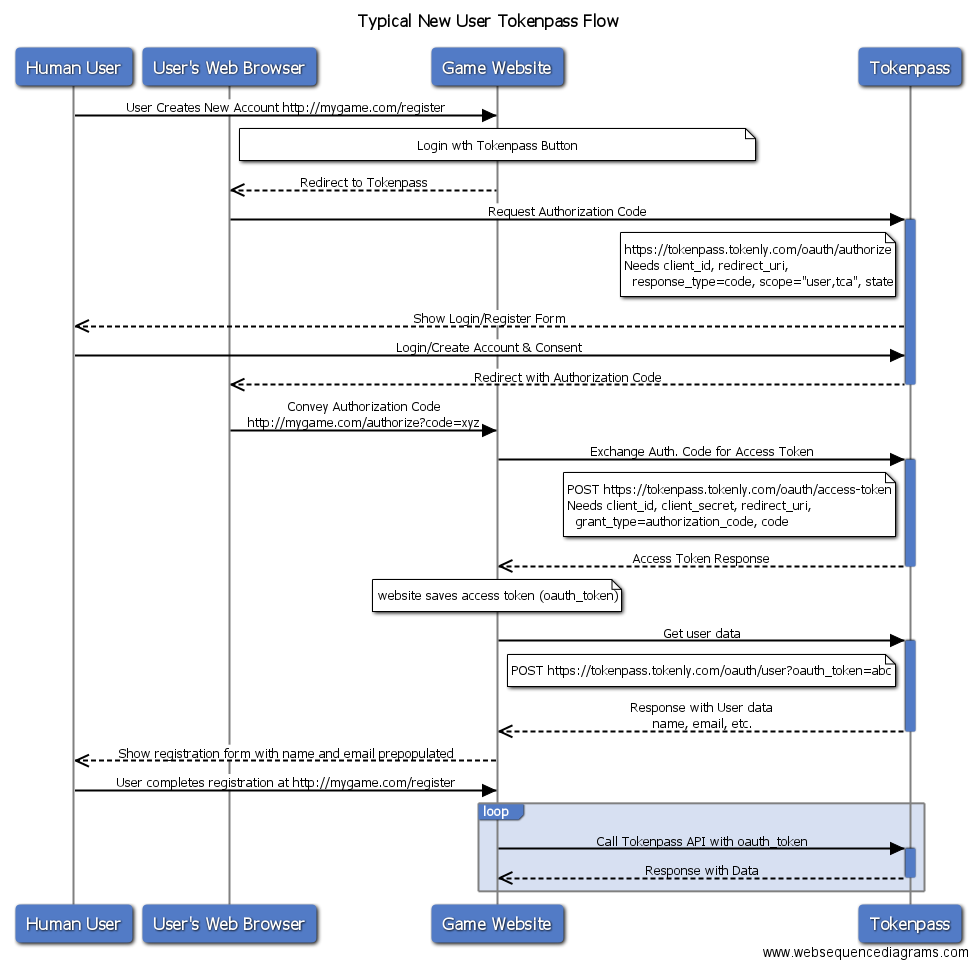
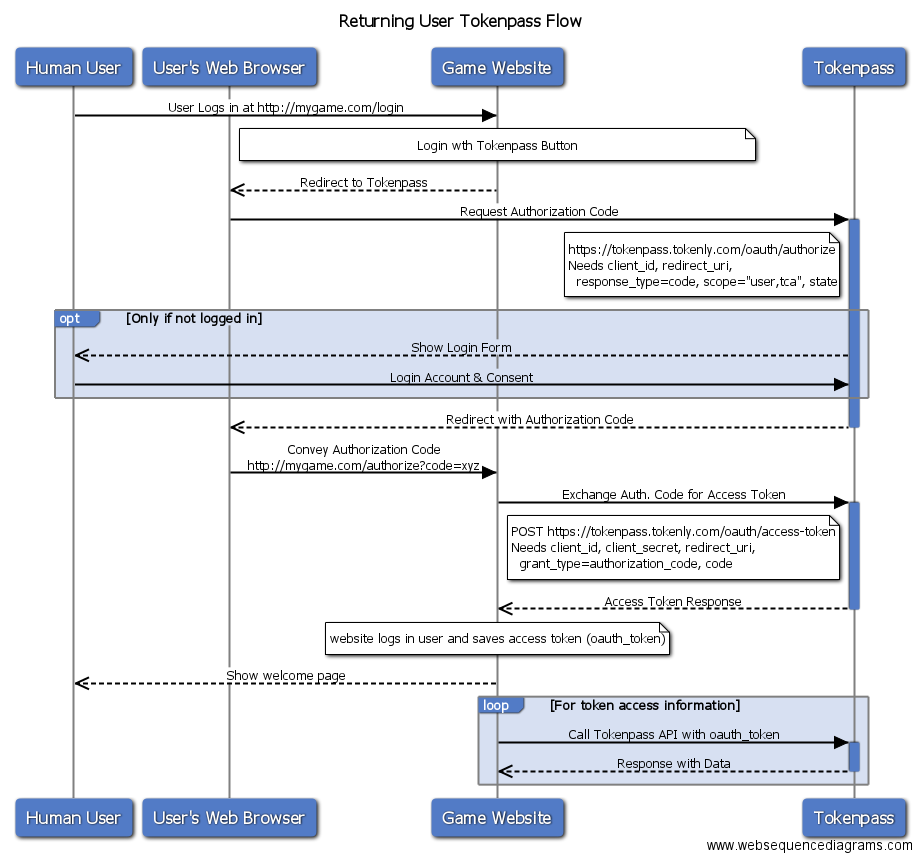
Below are process flow diagrams for a new and returning user flow.
| Typical New User OAuth Flow | Typical Returning User OAuth Flow |
|---|---|
 |
 |
Permission Scopes
The following permission scopes are available for use:
| Scope | Description |
|---|---|
| user | Basic user info required for most applications |
| tca | Able to make Token Controlled Access requests relating to this user. Checks balances held in both public and non-public addresses |
| private-balances | Able to view the combined token balances associated with this users' acount including those held in non-public addresses |
| private-address | Able to view all bitcoin addresses associated with this users' account including non-public ones |
| manage-address | Permission to manage this users' verified bitcoin addresses via API |
Token Controlled Access
Token Controlled Access (TCA) is the concept where access to content, features or special permissions within an application are granted to a user based on the contents of their bitcoin (or other cryptocurrency) wallet. A user first registers one or more bitcoin addresses to their Tokenpass account and goes through a "proof of ownership" process, which involves signing a random message with the private key associated with their address. Your application then makes requests to the Tokenpass API to check if a users' "inventory" contains the appropriate type and balance of the access tokens. A simple true/false is returned indicating if the user meets the balance requirements or not.
TCA Rules
When making a TCA request, it is possible to ask for more complicated combinations of requirements rather than just "does this user have at least X amount of MYTOKEN".
For instance, you can ask something like "does the user have 10,000 LTBCOIN OR 1 LTBSTAFF". Combinations and logic operators are defined in your query string
and come together to form the "TCA rule stack". The rule stack has three main types of fields, asset=balance, op_x and stackOp_x.
Where x is the index of the asset=balance field to modify in the stack.
The following logic operators are available:
| op | Description |
|---|---|
| >= | Greater than or equal to (default) |
| > | Greater than |
| = | Equal to |
| == | Equal to |
| != | Does not equal |
| ! | Does not equal |
| < | Less than |
| <= | Less than or equal to |
The following stack grouping operators are available:
| stackOp | Description |
|---|---|
| AND | (default) |
| OR | Rules previous to this are grouped together, e.g (AND AND) OR (this) |
An example TCA query looks like this:
/api/v1/tca/check/cryptonaut?LTBCOIN=10000<BSTAFF=1&op_0=>stackop_1=OR
The source code for the component which processes the TCA rule stack can be found here.
Check Token Access (User)
<?php
$api = new TokenpassAPI();
$user = 'cryptonaut';
$rules = array('TOKENLY' => 1, 'LTBCOIN' => 100000, 'stackop_1' => 'OR');
$check = $api->checkTokenAccess($user, $rules, $oauth_token);
if($check){
    //grant access
}
else{
    //access denied
}
var config = require('./config.json')
var TOKENPASS = require("tokenpass-api")
var tokenapiModule = new TOKENPASS(config.tokenpass.key,config.tokenpass.secret,config.tokenpass.api_url);
var username = 'ratinder'
var data = {oauth_token:'otsU0YpM5bWN4Cj4lTcpC1ZBtRLMGSnhqAiqzt12', TOKENLY: 1, LTBCOIN: 100000, stackop_1:'OR' }
tokenapiModule.checkTokenAccess(username,data).then(function(result){
    console.log(result);
    res.end(JSON.stringify(result))
},function(err){
    console.error(err);
    res.end(JSON.stringify(err))
})
Check if a user holds the appropriate tokens for TCA.
- Endpoint: /api/v1/tca/check/{username}
- Request Method: GET
- Authentication: hmac signature with
client_idandclient_secret, as well as validoauth_token - Returns:
result(boolean)
Check Token Access (Address)
<?php
$address = '1CPM4nnf9sjD7aU46gQki8moNdxwwkfjbf';
$rules = array('TOKENLY' => 1, 'LTBCOIN' => 100000, 'stackop_1' => 'OR');
$check = $api->checkAddressTokenAccess($address, $rules);
if($check){
    //grant access
}
else{
    //access denied
}
var config = require('./config.json')
var TOKENPASS = require("tokenpass-api")
var tokenapiModule = new TOKENPASS(config.tokenpass.key,config.tokenpass.secret,config.tokenpass.api_url);
var address = '1CPM4nnf9sjD7aU46gQki8moNdxwwkfjbf'
var data = {TOKENLY: 1, LTBCOIN: 100000, stackop_1:'OR' }
tokenapiModule.checkAddressTokenAccess(address,data).then(function(result){
    console.log(result);
    res.end(JSON.stringify(result))
},function(err){
    console.error(err);
    res.end(JSON.stringify(err))
})
Check if a specific bitcoin address holds a certain combination of tokens for TCA, no account necessary.
- Endpoint: /api/v1/tca/check-address/{address}
- Request Method: GET
- Authentication: none
- Returns:
result(boolean)
Token Promises
A token promise (also called a provisional transaction) is a temporary modification to a user or bitcoin address's internally tracked balance within Tokenpass. A promise must be made from a source address which contains a minimum balance of the amount to be promised. For TCA purposes, any promised balances are subtracted from the source address, effectively lending access rights from one address or user to another. Source addresses go through a proof of ownership process before they can be used (user verified addresses can be used as well).
Token promises can be used to give customers instant access without waiting for bitcoin network confirmations, and can be used for more advanced use cases such as access lending and rental systems.
Register Source Address
<?php
$api = new TokenpassAPI();
$address = '1CPM4nnf9sjD7aU46gQki8moNdxwwkfjbf';
$message = $address.'_'.hash('sha256', TOKENPASS_CLIENT);
$xchain_client = new Tokenly\XChainClient\Client(env('XCHAIN_URL'), env('XCHAIN_API_TOKEN'), env('XCHAIN_API_KEY'));
$proof = $xchain_client->signMessage($address, $message);
$register = $api->registerProvisionalSource($address, $proof, null);
if($register){
    //success
}
else{
    //failed
}
Registers a bitcoin address to the provisional source whitelist, allowing it to be used as a source for promises/provisional transactions.
0-conf transactions coming from source addresses are automatically registered as promises.
- Endpoint: /api/v1/tca/provisional/register
- Request Method: POST
- Authentication: hmac signature with
client_idandclient_secret - Scopes required: none
- Returns:
result(boolean)
Request Parameters:
| Parameter | Type | Description |
|---|---|---|
| address | string | Bitcoin address |
| proof | string | Verification message signed by address |
| assets | mixed | Array or comma separated string of assets to limit promises to (optional) |
The proof parameter should be a signature of the following message format: <btc_address>_<sha256 hash of client_id>
You may resubmit request with proof again to update list of restricted assets (or leave null to allow all).
Delete Source Address
<?php
$address = '1CPM4nnf9sjD7aU46gQki8moNdxwwkfjbf';
$delete = $api->deleteProvisionalSource($address);
if($delete){
    //success
}
else{
    //failed
}
Removes an address which you have previously registered from the provisional source whitelist.
- Endpoint: /api/v1/tca/provisional/register/{address}
- Request Method: DELETE
- Authentication: hmac signature with
client_idandclient_secret - Returns:
result(boolean)
List Source Addresses
<?php
$source_addresses = $api->getProvisionalSourceList();
if($source_addresses){
    foreach($source_addresses as $source_address){
        $address = $source_address['address'];
        $restricted_assets = $source_address['assets'];
        //do something
    }
}
Lists all source addresses you have registered using your API key.
- Endpoint: /api/v1/tca/provisional
- Request Method: GET
- Authentication: hmac signature with
client_idandclient_secret - Returns:
result (boolean)proof_suffix (string)whitelist (array of Source Address Objects)
Submit Provisional TX
<?php
$source = '1CPM4nnf9sjD7aU46gQki8moNdxwwkfjbf';
$token = 'TOKENLY';
$amount = 1*100000000; //1 token converted to satoshi measurement
$destination = 'user:cryptonaut';
//lend this token for 1 hour
$promise = $api->promiseTransaction($source, $destination, $token, $amount, time()+3600);

if($promise){
    //success, save data somewhere
    $saved_data = $promise;
}
else{
    //failed
}
Submits a token promise to a desired username or address.
Note that you cannot submit promise transactions which would exceed the source address's real balance.
If a real txid/fingerprint is set, tokenpass will automatically remove this provisional tx after 2 confirmations (or when expiration hits).
- Endpoint: /api/v1/tca/provisional/tx
- Request Method: POST
- Authentication: hmac signature with
client_idandclient_secret - Returns:
result (boolean)tx (Provisional TX Object)
Request Parameters:
| Parameter | Type | Description |
|---|---|---|
| source | string | Source address to use |
| destination | string | Destination bitcoin address or user:{username} |
| asset | string | Token to promise |
| quantity | integer | Amount, in satoshis |
| expiration | timestamp | Time that the promise expires, can be set to null |
| txid | string | (optional) transaction ID of the real bitcoin transaction in-flight |
| fingerprint | string | (optional) xchain transaction fingerprint of the real btc tx |
| ref | string | (optional) extra reference data |
| note | string | (optional) note to display to user |
List Provisional TXs
<?php
$list = $api->getPromisedTransactionList();
if($list){
    foreach($list as $promise){
        //do something
    }
}
Gives you a list of all token promises you have made with your API key.
- Endpoint: /api/v1/tca/provisional/tx
- Request Method: GET
- Authentication: hmac signature with
client_idandclient_secret - Returns:
result (boolean)list (array of Provisional TX Objects)
Get Provisional TX
<?php
$promise_id = $saved_data['promise_id'];
$get = $api->getPromisedTransaction($promise_id);
if($get){
    //promise tx found
}
Get details on a specific provisional transaction you have made.
- Endpoint: /api/v1/tca/provisional/tx/{promise_id|txid|fingerprint}
- Request Method: GET
- Authentication: hmac signature with
client_idandclient_secret - Returns:
result (boolean)tx (Provisional TX Object)
Cancel Provisional TX
<?php
$promise_id = $saved_data['promise_id'];
$delete = $api->deletePromisedTransaction($promise_id);
if($delete){
    //success
}
Removes a promise you have made from the system.
- Endpoint: /api/v1/tca/provisional/tx/{promise_id|txid|fingerprint}
- Request Method: DELETE
- Authentication: hmac signature with
client_idandclient_secret - Returns:
result (boolean)
Update Provisional TX
<?php
$id = $saved_data['promise_id'];
$new_time = time()+7200;
$new_data = array('expiration' => $new_time);
$update = $api->updatePromisedTransaction($id, $new_data);
if($update){
    //update success
}
else{
    //failed
}
Update details for a promise you have made, such as bumping the expiration time or including the real on-chain transaction ID.
- Endpoint: /api/v1/tca/provisional/tx/{promise_id|txid|fingerprint}
- Request Method: PATCH
- Authentication: hmac signature with
client_idandclient_secret - Returns:
result (boolean)tx (Provisional TX Object)
Request Parameters:
| Parameter | Type | Description |
|---|---|---|
| quantity | integer | (optional) Amount, in satoshis |
| expiration | timestamp | (optional) Time that the promise expires, can be set to null |
| txid | string | (optional) transaction ID of the real bitcoin transaction in-flight |
| fingerprint | string | (optional) xchain transaction fingerprint of the real btc tx |
| ref | string | (optional) extra reference data |
| note | string | (optional) note to display to user |
Source Address Object
    {
        "address": "1CPM4nnf9sjD7aU46gQki8moNdxwwkfjbf",
        "assets": null
    }
Response data for addresses registered to the provisional source whitelist.
Response variables
| Variable | Type | Description |
|---|---|---|
| address | string | Bitcoin address |
| assets | array | Assets this address is restricted to for promises, can be null. |
Provisional TX Object
{
    "source": "1CPM4nnf9sjD7aU46gQki8moNdxwwkfjbf",
    "destination": "14eRVGNPQChSmSmNLH6RPjdwsNPc7rH2Z7",
    "asset": "WALMART",
    "quantity": 52500000000,
    "fingerprint": null,
    "txid": null,
    "ref": null,
    "expiration": 1472456354,
    "created_at": "2016-08-28 07:35:04",
    "updated_at": "2016-08-28 07:35:04",
    "pseudo": 0,
    "note": null,
    "promise_id": 42
}
Response data for individual provisional transactions / token promises.
Response variables
| Variable | Type | Description |
|---|---|---|
| source | string | Source bitcoin address |
| destination | string | Destination user or address |
| asset | string | Promised token |
| quantity | integer | Amount promised, in satoshis |
| fingerprint | string | XChain transaction fingerprint, if available |
| txid | string | Bitcoin transaction ID, if available |
| ref | string | Optional reference data |
| expiration | integer | Unix timestamp when this expires, or null |
| created_at | timestamp | Time the promise was created |
| updated_at | timestamp | Last time updated |
| pseudo | boolean | If this is a "pseudo" token promise or not |
| note | string | Optional note to display to user |
| promise_id | integer | Internal ID for tracking this transaction. |
Address Management
The Tokenpass API allows advanced applications using the manage-address and private-address OAuth permission scopes to
modify or look at a user's list of registered & verified bitcoin addresses. Addresses are also sometimes referred to as "Pockets", and
token balances as the "inventory".
Get Personal Address List
<?php
$api = new TokenpassAPI();
$user = 'cryptonaut';
$address_list = $api->getAddressesForAuthenticatedUser($oauth_token);
if($address_list){
    foreach($address_list as $address){
        //do something
    }
}
var config = require('./config.json')
var TOKENPASS = require("tokenpass-api")
var tokenapiModule = new TOKENPASS(config.tokenpass.key,config.tokenpass.secret,config.tokenpass.api_url);
var data = {oauth_token:'otsU0YpM5bWN4Cj4lTcpC1ZBtRLMGSnhqAiqzt12',scope:'tca'}
tokenapiModule.getAddressesForAuthenticatedUser(data).then(function(result){
    console.log(result);
    res.end(JSON.stringify(result))
},function(err){
    console.error(err);
    res.end(JSON.stringify(err))
})
- Endpoint: /api/v1/tca/addresses
- Request Method: GET
- Authentication:
oauth_token - Scopes:
tca - Optional Scopes:
private-address,manage-address - Returns:
result (array of User Address Objects)
If the private-address scope is not enabled, only public and verified addresses are returned.
If the requested user has connected to your application with the private-address scope applied, you will be returned all public, private, verified and non-verified addresses on their account.
Register Address
<?php

$address = '14eRVGNPQChSmSmNLH6RPjdwsNPc7rH2Z7';
$label = 'My test address';
$public = true;
$register = $api->registerAddress($address, $oauth_token, $label, $public);
if($register){
    //success
}
else{
    //failed
}
var config = require('./config.json')
var TOKENPASS = require("tokenpass-api")
var tokenapiModule = new TOKENPASS(config.tokenpass.key,config.tokenpass.secret,config.tokenpass.api_url);
var postData = {address:'14eRVGNPQChSmSmNLH6RPjdwsNPc7rH2Z7', label:"My test address", public: true, active:true, oauth_token: 'G9nIzjvKzamo3JyymepA44xjz7cSOBExILsCzv12', scope:'manage-address' }
tokenapiModule.registerAddress(postData).then(function(result){
    console.log(result);
    res.end(JSON.stringify(result))
},function(err){
    console.error(err);
    res.end(JSON.stringify(err))
})
Registers a bitcoin address to the system.
An address must go through a proof of ownership process before it can be used for token access purposes.
For security reasons, addresses registered via API cannot be used for logging in or for two-factor authentication.
- Endpoint: /api/v1/tca/address
- Request Method: POST
- Authentication:
oauth_token - Scopes:
manage-address - Returns:
result (User Address Object)
Request Parameters:
| Parameter | Type | Description |
|---|---|---|
| address | string | Bitcoin address to register |
| label | string | Optional display label |
| public | boolean | If this address is publicly viewable or not, default false |
| active | boolean | Make this address active for TCA, or not, default true |
| type | string | Network type (only btc supported, default) |
Get Personal Address Details
<?php
$address = '14eRVGNPQChSmSmNLH6RPjdwsNPc7rH2Z7';
$details = $api->getAddressDetailsForAuthenticatedUser($address, $oauth_token);
if($details){
    //address found, do something
}
var config = require('./config.json')
var TOKENPASS = require("tokenpass-api")
var tokenapiModule = new TOKENPASS(config.tokenpass.key,config.tokenpass.secret,config.tokenpass.api_url);
var address = '14eRVGNPQChSmSmNLH6RPjdwsNPc7rH2Z7'
var data = {oauth_token:'otsU0YpM5bWN4Cj4lTcpC1ZBtRLMGSnhqAiqzt12',scope:'tca'}
tokenapiModule.getAddressDetailsForAuthenticatedUser(address,data).then(function(result){
    console.log(result.result.verify_code);
    res.end(JSON.stringify(result))
},function(err){
    console.error(err);
    res.end(JSON.stringify(err))
})
Get information about a specific registered bitcoin address, including a list of token balances.
- Endpoint: /api/v1/tca/address/{address}
- Request Method: GET
- Authentication:
oauth_token - Scopes:
tca - Optional Scopes:
private-address,manage-address - Returns:
result (User Address Object)
Verify Address
<?php
$address = '14eRVGNPQChSmSmNLH6RPjdwsNPc7rH2Z7';
$details = $api->getAddressDetailsForAuthenticatedUser($address, $oauth_token);
if($details){
    $message = $details['verify_code'];
    $xchain_client = new Tokenly\XChainClient\Client(env('XCHAIN_URL'), env('XCHAIN_API_TOKEN'), env('XCHAIN_API_KEY'));
    $signature = $xchain_client->signMessage($address, $message);
    $verify = $api->verifyAddress($address, $oauth_token, $signature);
    if($verify){
        //verification success
    }
    else{
        //signature invalid or other error
    }
}
Provide Tokenpass a proof-of-ownership signature to verify a registered bitcoin address.
- Endpoint: /api/v1/tca/address/{address}
- Request Method: POST
- Authentication:
oauth_token - Scopes:
manage-address - Returns:
result (boolean)
Request Parameters:
| Parameter | Type | Description |
|---|---|---|
| signature | string | Signed message of the verify_code field from the User Address Object |
Update Address
<?php
//toggle address inactive
$address = '14eRVGNPQChSmSmNLH6RPjdwsNPc7rH2Z7';
$user = 'cryptonaut';
$active = false;
$update = $api->updateAddressDetails($address, $oauth_token, null, null, $active);
if($update){
    //update success
}
else{
    //failed
}
var config = require('./config.json')
var TOKENPASS = require("tokenpass-api")
var tokenapiModule = new TOKENPASS(config.tokenpass.key,config.tokenpass.secret,config.tokenpass.api_url);
var address = '14eRVGNPQChSmSmNLH6RPjdwsNPc7rH2Z7'
var data = {label:'Test update address',public: true, active:true,oauth_token:'otsU0YpM5bWN4Cj4lTcpC1ZBtRLMGSnhqAiqzt12',scope:'manage-address'}
tokenapiModule.updateAddressDetails(address,data).then(function(result){
    console.log(result);
    res.end(JSON.stringify(result))
},function(err){
    console.error(err);
    res.end(JSON.stringify(err))
})
Update the basic details on a registered address.
- Endpoint: /api/v1/tca/address/{address}
- Request Method: PATCH
- Authentication:
oauth_token - Scopes:
manage-address - Returns:
result (User Address Object)
Request Parameters:
| Parameter | Type | Description |
|---|---|---|
| label | string | (optional) Display label |
| public | boolean | (optional) toggle address public/private |
| active | boolean | (optional) toggle active state of address |
Delete Address
<?php
//toggle address inactive
$address = '14eRVGNPQChSmSmNLH6RPjdwsNPc7rH2Z7';
$active = false;
$delete = $api->deleteAddres($address, $oauth_token);
if($delete){
    //delete success
}
else{
    //failed
}
var config = require('./config.json')
var TOKENPASS = require("tokenpass-api")
var tokenapiModule = new TOKENPASS(config.tokenpass.key,config.tokenpass.secret,config.tokenpass.api_url);
var address = '14eRVGNPQChSmSmNLH6RPjdwsNPc7rH2Z7'
var data = {oauth_token:'otsU0YpM5bWN4Cj4lTcpC1ZBtRLMGSnhqAiqzt12',scope:'manage-address'}
tokenapiModule.deleteAddress(address,data).then(function(result){
    console.log(result);
    res.end(JSON.stringify(result))
},function(err){
    console.error(err);
    res.end(JSON.stringify(err))
})
Remove a registered bitcoin address from the system.
- Endpoint: /api/v1/tca/address/{address}
- Request Method: DELETE
- Authentication:
oauth_token - Scopes:
manage-address - Returns:
result (boolean)
Instant Register & Verify
This method allows addresses to be registered and verified on a user account using a single request and with minimal authentication required.
The Pockets management section in the Tokenpass user dashboard generates a unique verification code tied to their current browser session. This code can be read either via browser extension or by scanning the provided QR code, and then used to complete a valid instant verification request.
For browser extensions, look for the HTML element with ID #instant-address-qr and then look at the data-verify-message property.
- Endpoint: /api/v1/instant-verify/{username}
- Request Method: POST
- Authentication: none
- Scopes: none
- Returns:
result (boolean)
Request Parameters:
| Parameter | Type | Description |
|---|---|---|
| msg | string | Verification message obtained from QR code |
| address | string | Bitcoin address to register |
| sig | string | Signed message of the msg field from the bitcoin address. |
Lookup User By Address
<?php
$address = '14eRVGNPQChSmSmNLH6RPjdwsNPc7rH2Z7';
$lookup = $api->lookupUserByAddress($address);
if($lookup){
    //send them an email
}
var config = require('./config.json')
var TOKENPASS = require("tokenpass-api")
var tokenapiModule = new TOKENPASS(config.tokenpass.key,config.tokenpass.secret,config.tokenpass.api_url);
var address = '14eRVGNPQChSmSmNLH6RPjdwsNPc7rH2Z7'
tokenapiModule.lookupUserByAddress(address).then(function(result){
    console.log(result);
    res.end(JSON.stringify(result))
},function(err){
    console.error(err);
    res.end(JSON.stringify(err))
})
Search to see if a bitcoin address belongs to any users in Tokenpass (address must be set to public).
- Endpoint: /api/v1/lookup/address/{address}
- Request Method: GET
- Authentication: hmac signature with
client_idandclient_secret - Scopes: none
- Returns:
result (User Lookup Object)
Get Public Address List
<?php
$api = new TokenpassAPI();
$user = 'cryptonaut';
$address_list = $api->getPublicAddresses($user);
if($address_list){
    foreach($address_list as $address){
        //do something
    }
}
var config = require('./config.json')
var TOKENPASS = require("tokenpass-api")
var tokenapiModule = new TOKENPASS(config.tokenpass.key,config.tokenpass.secret,config.tokenpass.api_url);
var username = 'ratinder'
tokenapiModule.getPublicAddresses(username).then(function(result){
    console.log(result);
    res.end(JSON.stringify(result))
},function(err){
    console.error(err);
    res.end(JSON.stringify(err))
})
- Endpoint: /api/v1/tca/addresses/{username}
- Request Method: GET
- Authentication: hmac signature with
client_idandclient_secret - Scopes: none
- Returns:
result (array of User Address Objects)
Only addresses that are active, verified and marked public are returned.
Get Public Address Details
<?php
$address = '14eRVGNPQChSmSmNLH6RPjdwsNPc7rH2Z7';
$username = 'cryptonaut';
$details = $api->getPublicAddressDetails($username, $address);
if($details){
    //address found, do something
}
var config = require('./config.json')
var TOKENPASS = require("tokenpass-api")
var tokenapiModule = new TOKENPASS(config.tokenpass.key,config.tokenpass.secret,config.tokenpass.api_url);
var username = 'ratinder'
var address = '14eRVGNPQChSmSmNLH6RPjdwsNPc7rH2Z7'
tokenapiModule.getPublicAddressDetails(username,address).then(function(result){
    console.log(result);
    res.end(JSON.stringify(result))
},function(err){
    console.error(err);
    res.end(JSON.stringify(err))
})
Get information about a specific registered bitcoin address, including a list of token balances. Only active and public addresses are available.
- Endpoint: /api/v1/tca/addresses/{username}/{address}
- Request Method: GET
- Authentication: hmac signature with
client_idandclient_secret - Returns:
result (User Address Object)
Lookup Address By User
<?php
$user = 'cryptonaut';
$lookup = $api->lookupAddressByUser($user);
if($lookup){
    //send them some tokens to their public address
}
var config = require('./config.json')
var TOKENPASS = require("tokenpass-api")
var tokenapiModule = new TOKENPASS(config.tokenpass.key,config.tokenpass.secret,config.tokenpass.api_url);
var username = 'ratinder'
tokenapiModule.lookupAddressByUser(username).then(function(result){
    console.log(result);
    res.end(JSON.stringify(result))
},function(err){
    console.error(err);
    res.end(JSON.stringify(err))
})
Get the first (public) registered bitcoin address owned by this user.
- Endpoint: /api/v1/lookup/user/{username}
- Request Method: GET
- Authentication: hmac signature with
client_idandclient_secret - Scopes: none
- Returns:
result (User Lookup Object)
User Address Object
{
    "address": "14eRVGNPQChSmSmNLH6RPjdwsNPc7rH2Z7",
    "balances": {
        "A11135283252627285275": 100000000,
        "A11147438449329202874": 100000000,
        "WALMART": "52500000000"
    },
    "public": true,
    "label": "Test address",
    "active": true,
    "verified": true
}
Details returned for individual registered/verified bitcoin addresses.
Response variables
| Variable | Type | Description |
|---|---|---|
| address | string | Bitcoin address |
| balances | array | Array of token balances in format Asset => Quantity |
| public | boolean | If this address is set to public or not |
| label | string | Optional display label |
| active * | boolean | Active toggle |
| verified * | boolean | If this address is verified or not |
| verify_code * | string | Verification code to sign |
* only shown if oauth_token provided with manage-address scope.
verify_code is only included if address unverified.
User Lookup Object
{
    "username": "Cryptonaut",
    "address": "14eRVGNPQChSmSmNLH6RPjdwsNPc7rH2Z7",
    "email": "[email protected]"
}
Data returned by the lookup address by user / user by address methods.
Response variables
| Variable | Type | Description |
|---|---|---|
| username | string | Tokenpass username |
| address | string | Bitcoin address |
| string | Email address of user, depending on their user preferences |
Balance Lookups
The Tokenpass API allows authorized applications to query the combined balances of a user's addresses. Applications authorized with the tca scope can receive the combined balances of public addresses. Appllications authorized with the private-balances OAuth permission scope can receive the combined balances of a user's public and private addresses.
Get Combined Public Balances
<?php
$api = new TokenpassAPI();
$balance_list = $api->getCombinedPublicBalances($oauth_token);
if ($balance_list) {
    foreach ($balance_list as $balance_entry) {
        echo "You have {balance_entry['balance']} of {balance_entry['name']}".PHP_EOL;
    }
}
var config = require('./config.json')
var TOKENPASS = require("tokenpass-api")
var tokenapiModule = new TOKENPASS(config.tokenpass.key,config.tokenpass.secret,config.tokenpass.api_url);
var data = {oauth_token:'otsU0YpM5bWN4Cj4lTcpC1ZBtRLMGSnhqAiqzt12',scope:'tca'}
tokenapiModule.getCombinedPublicBalances(data).then(function(result){
    console.log(result);
    res.end(JSON.stringify(result))
},function(err){
    console.error(err);
    res.end(JSON.stringify(err))
})
- Endpoint: /api/v1/tca/public/balances
- Request Method: GET
- Authentication:
oauth_token - Scopes:
tca - Returns:
result (array of Balance Objects)
The combined balances of public, active and verified addresses are returned.
Get Combined Protected Balances
<?php
$api = new TokenpassAPI();
$balance_list = $api->getCombinedProtectedBalances($oauth_token);
if ($balance_list) {
    foreach ($balance_list as $balance_entry) {
        echo "You have {balance_entry['balance']} of {balance_entry['name']}".PHP_EOL;
    }
}
var config = require('./config.json')
var TOKENPASS = require("tokenpass-api")
var tokenapiModule = new TOKENPASS(config.tokenpass.key,config.tokenpass.secret,config.tokenpass.api_url);
var data = {oauth_token:'otsU0YpM5bWN4Cj4lTcpC1ZBtRLMGSnhqAiqzt12',scope:'tca,manage-address,private-address'}
tokenapiModule.getCombinedProtectedBalances(data).then(function(result){
    console.log(result);
    res.end(JSON.stringify(result))
},function(err){
    console.error(err);
    res.end(JSON.stringify(err))
})
- Endpoint: /api/v1/tca/protected/balances
- Request Method: GET
- Authentication:
oauth_token - Scopes:
private-balances - Returns:
result (array of Balance Objects)
The combined balances of all active and verified addresses are returned, including addresses marked private.
Balance Object
  {
      "asset": "ASSETONE",
      "name": "ASSETONE",
      "balance": 11,
      "balanceSat": "1100000000"
  }
Data returned by the balance lookup methods.
Response variables
| Variable | Type | Description |
|---|---|---|
| asset | string | The asset identifier such as TOKENLY or A14212499953269578000 |
| name | string | The short asset name. For enhanced assets, the name may be different that the identifier |
| balance | float | The conbined balance of this asset as a float |
| balanceSat | string | The balance in satoshis |
App Credits
App credit groups are custom types of points, or "credits" (database only), that your apps can use and assign either arbitrarily, or to a Tokenpass user account. Useful for selling or rewarding non-token, on-site credit and debiting or crediting for different types of interactions.
Use the API methods below to manage types of credits, create accounts and credit or debit balances. A double entry accounting system is used, so every debit has a corresponding credit etc. to keep the ledger balanced.
Create New Credit Group
Register a new App Credit Group under your API user. Each credit group can be used by one or more OAuth client apps
by including the Client ID portion of their API keys to the app_whitelist field.
Note: Credit groups can only be deleted via the developer web interface.
<?php
$name = "Bob's Credits";
$app_whitelist = array(TOKENPASS_CLIENT_ID);
$credit_group = $api->newAppCreditGroup($name, $app_whitelist);
if($credit_group){
    //success!
}
else{
    //failed
}
- Endpoint: /api/v1/credits
- Request Method: POST
- Returns:
credit_group (Credit Group Object)
Request Parameters:
| Parameter | Type | Description |
|---|---|---|
| name | string | Name of the credit group, e.g 'Streaming Credits' |
| app_whitelist | array | Array of tokenpass api client ID's that can use and access these credits |
Update Credit Group
Update an existing App Credit Group.
<?php
$new_name = "Bob's Store Credits";
$update = $api->updateAppCreditGroup($credit_group['uuid'], array('name' => $new_name));
if($update){
    //success
}
else{
    //failed
}
- Endpoint: /api/v1/credits/{group_uuid}
- Request Method: PATCH
- Returns:
credit_group (Credit Group Object)
Request Parameters:
| Parameter | Type | Description |
|---|---|---|
| name | string | Name of the credit group, e.g 'Streaming Credits' |
| app_whitelist | array | Array of tokenpass api client ID's that can use and access these credits |
List Credit Groups
Retrieve a list of App Credit Groups under your API user.
<?php
$credit_groups = $api->listAppCreditGroups();
if($credit_groups){
    foreach($credit_groups as $credit_group){
        //do something
    }
}
- Endpoint: /api/v1/credits
- Request Method: GET
- Returns:
list (array of Credit Group Objects)
Get Credit Group
Get basic details on a given App Credit Group
<?php
$credit_group = $api->getAppCreditGroup($group_uuid);
if($credit_group){
    //do something
}
else{
    //not found
}
- Endpoint: /api/v1/credits/{group_uuid}
- Request Method: GET
- Returns:
credit_group (Credit Group Object)
Credit Group History
Get full credit/debit transaction history for a App Credit Group
<?php
$tx_history = $api->getAppCreditGroupHistory($group_uuid);
if($tx_history){
    foreach($tx_history['transactions'] as $tx){
        //do something
    }
}
- Endpoint: /api/v1/credits/{group_uuid}/history
- Request Method: GET
- Returns:
balance (integer)- should always be balanced at 0count (integer)- number of entriestransactions (array of Credit Transaction Objects)
List Credit Accounts
List all accounts registered under an App Credit Group
<?php
$accounts = $api->listAppCreditAccounts($group_uuid);
if($accounts){
    foreach($accounts as $account){
        //do something
    }
}
- Endpoint: /api/v1/credits/{group_uuid}/accounts
- Request Method: GET
- Returns:
balance (integer)- should always be balanced at 0count (integer)- number of entrieslist (array of Credit Account Objects)
New Credit Account
Register a new account for a App Credit Group. Accounts can be either arbitrary or tied to a Tokenpass user.
To tie a credit account to a Tokenpass user, simply set the name field to the uuid of the Tokenpass account.
<?php
$name = '83468000-fc94-4016-8b54-27814c188980'; //tokenpass account UUID
$account = $api->newAppCreditAccount($group_uuid, $name);
if($account){
    //success
}
- Endpoint: /api/v1/credits/{group_uuid}/accounts
- Request Method: POST
- Returns:
account (Credit Account Object)
Request Parameters:
| Parameter | Type | Description |
|---|---|---|
| name | string | Name of the credit account, either tokenpass UUID or other |
Get Credit Account
Get details including balance for a given credit account.
<?php
$account = $api->getAppCreditAccount($group_uuid, $account_uuid);
if($account){
    //do something
}
else{
    //not found
}
- Endpoint: /api/v1/credits/{group_uuid}/accounts/{account_uuid}
- Request Method: GET
- Returns:
account (Credit Account Object)
Credit Account History
Retrieve full credit/debit transaction history specifically for an app credit account.
<?php
$tx_history = $api->getAppCreditAccountHistory($group_uuid, $account_uuid);
if($tx_history){
    $balance = $tx_history['account']['balance'];
    foreach($tx_history['transactions'] as $tx){
        //do something
    }
}
- Endpoint: /api/v1/credits/{group_uuid}/accounts/{account_uuid}/history
- Request Method: GET
- Returns:
account (Credit Account Object)count (integer)- number of entriestransactions (array of Credit Transaction Objects)
Give App Credits (credit)
Assign app credits to one or more accounts. Each account must be valid and already made.
A corresponding debit transaction is created for each credit entry in order to keep the ledger balanced.
The source parameter allows you to choose which credit account the debit tx applies to, otherwise the
default internal account _` is used.
<?php
$accounts_amounts = array();
$accounts_amounts[] = array('account' => '83468000-fc94-4016-8b54-27814c188980', 'amount' => 5000):
$credit_txs = $api->giveMultipleAppCredit($group_uuid, $accounts_amounts);
if($credit_txs){
    //success
    foreach($credit_txs['transactions'] as $tx){
        $credit_entry = $tx['credit'];
        $debit_entry = $tx['debit'];

        //do something
    }
}
else{
    //failed
}
- Endpoint: /api/v1/credits/{group_uuid}/accounts/credit
- Request Method: POST
- Returns:
transactions (array)credit (Credit Transaction Object)debit (Credit Transaction Object)
Request Parameters:
| Parameter | Type | Description |
|---|---|---|
| accounts | array | List of one or more accounts to create credit tx entries for |
accounts Field Array Parameters:
| Parameter | Type | Description |
|---|---|---|
| account | string | Account name or UUID to credit |
| amount | integer | Number of credits to give them |
| ref | string | Optional custom reference data. |
| source | string | Optional account name or UUID to apply corresponding debit tx |
Take App Credits (debit)
Take away / debit app credits from one or more accounts.
A corresponding credit transaction is created for each credit entry in order to keep the ledger balanced.
The destination parameter allows you to choose which credit account the credit tx applies to, otherwise the
default internal account _` is used.
<?php
$accounts_amounts = array();
$accounts_amounts[] = array('account' => '83468000-fc94-4016-8b54-27814c188980', 'amount' => 2500):
$debit_txs = $api->takeMultipleAppCredit($group_uuid, $accounts_amounts);
if($debit_txs){
    //success
    foreach($debit_txs['transactions'] as $tx){
        $debit_entry = $tx['debit'];
        $credit_entry = $tx['credit'];

        //do something
    }
}
else{
    //failed
}
- Endpoint: /api/v1/credits/{group_uuid}/accounts/debit
- Request Method: POST
- Returns:
transactions (array)debit (Credit Transaction Object)credit (Credit Transaction Object)
Request Parameters:
| Parameter | Type | Description |
|---|---|---|
| accounts | array | List of one or more accounts to create debit tx entries for |
accounts Field Array Parameters:
| Parameter | Type | Description |
|---|---|---|
| account | string | Account name or UUID to debit |
| amount | integer | Number of credits to take from them |
| ref | string | Optional custom reference data. |
| destination | string | Optional account name or UUID to apply corresponding credit tx |
Credit Group Object
Details returned for credit group methods.
{
  "name": "Store Credits",
  "uuid": "6b63093b-c7ab-40fc-b9e1-e26bd3258f69",
  "active": true,
  "app_whitelist": [
    "APITOKEN_001"
  ],
  "created_at": "2017-01-14 23:07:46",
  "updated_at": "2017-01-14 23:07:46"
}
Response variables
| Variable | Type | Description |
|---|---|---|
| name | string | Name of the App Credit Group |
| uuid | string | Credit group unique ID |
| active | boolean | Active and available for use |
| app_whitelist | array | Array of Tokenpass API Client IDs |
| created_at | timestamp | Timestamp of date group was created |
| updated_at | timestamp | Timestamp of last data update |
Credit Account Object
Details returned for credit account detail methods.
{
  "name": "6d206ea5-26b9-498f-b86c-ab990f7808e0",
  "uuid": "b40e8d61-728a-4ede-882c-65702daa820d",
  "balance": 2500,
  "tokenpass_user": {
    "uuid": "6d206ea5-26b9-498f-b86c-ab990f7808e0",
    "slug": "bob",
    "username": "Bob"
  },
  "created_at": "2017-01-14 23:06:22",
  "updated_at": "2017-01-14 23:06:22"
}
Response variables
| Variable | Type | Description |
|---|---|---|
| name | string | Name of the App Credit Group |
| uuid | string | Credit account unique ID |
| balance | integer | Credit account balance |
| tokenpass_user | array | Either false or array with fields username, slug, uuid |
| created_at | timestamp | Timestamp of date account was registered |
| updated_at | timestamp | Timestamp of last account entry update |
Credit Transaction Object
Details returned for credit transaction history methods.
{
  "credit_group": "3a4572d5-c7b4-4b50-9594-5c31b4bafc45",
  "account": "82ff57d2-ebf3-40ad-982e-1133a2ea2214",
  "tokenpass_user": "air_casual_39",
  "account_uuid": "b0c36575-1c33-4123-8a08-e5d34c2d9274",
  "tx_uuid": "d4ceaa37-1863-4d25-8036-b958e0336427",
  "amount": "500",
  "created_at": "2017-01-14 23:04:04",
  "updated_at": "2017-01-14 23:04:04",
  "ref": null
}
Response variables
| Variable | Type | Description |
|---|---|---|
| uuid | string | Credit transaction unique ID |
| app_credit_group_uuid | string | Credit group ID |
| account_uuid | string | Credit account ID |
| account_name | string | Credit account name |
| amount | integer | Amount to adjust account balance |
| ref | string | Optional extra reference data |
| created_at | timestamp | Timestamp of when tx was created |
| updated_at | timestamp | Timestamp of when entry was last updated |
Account Registration
Allows direct registration using account credentials.
Register a New Account
Register a new account with the given email, username and password.
<?php
$username = 'leroyjenkins';
$password = 'Sup3r$3K4et';
$email = '[email protected]';
$new_user = $api->registerAccount($username, $password, $email);
if($new_user){
    //success!
}
else{
    //failed
}
- Endpoint: /api/v1/register
- Request Method: POST
- Authentication: A valid
client_idonly - Returns:
result (New User Object)
Request Parameters:
| Parameter | Type | Description |
|---|---|---|
| client_id | string | A valid Tokenpass application client ID |
| username | string | The username for the new user |
| password | string | The plain text password for the new user |
| string | The email address for the new user |
New User Object
Details returned for the new user object
{
    "id": "d2dd059f-1a62-4c0b-bc1f-00fce377d936",
    "username": "leroyjenkins",
    "email": "[email protected]"
}
Response variables
| Variable | Type | Description |
|---|---|---|
| id | string | Unique ID for this user |
| username | string | The username for the new user |
| string | The email address for the new user |
Authentication
Protected API calls require authentication with a client id and client secret key. The PHP client handles authentication. To add authentication for other clients, see https://github.com/tokenly/hmac-auth/blob/master/README.md for details.